A take is a candidate from an edit or extraction. BASE mounts it on Master so you can hear and position it. Merge keeps the audible result in Master.

Mount and compare

  1. Expand the take group under EXTRACTED. Use the take’s play button to hear it alone.
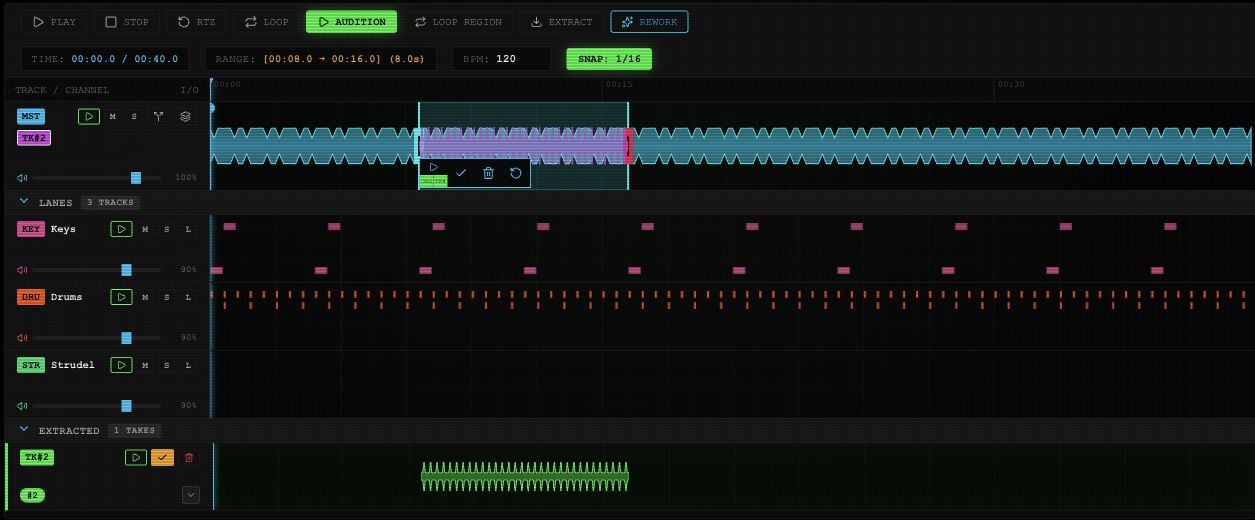
  2. Select BASE to mount it. The button becomes a checkmark, and a TK overlay appears on Master.
  3. Select the overlay. Drag it horizontally to change its position; use its reset arrow to return it to the original position.
  4. Use ORG for the original audio underneath and TK# for the take. Turn each on or off to compare.
When a group has several takes, its numbered buttons choose the candidate. The expand arrow shows all takes in that group together.
Mounted Take 2 overlay on Master with original and take toggles, merge checkmark, trash and reset controls.

A mounted take and its comparison, merge, discard and reset controls in an example project.

For an added layer, leave ORG and TK# on to hear both. For a replacement, turn ORG off in that region. The selected overlay’s play button previews its section.

Merge one section

Select the mounted overlay and use its merge checkmark. If you’ve selected a smaller range inside the take, only that portion is merged. The unused portion stays pending. Listen with the intended original/take toggles before merging. A silenced take isn’t included.

Merge all mounted takes

Use the stacked-layer icon on the Master row, labeled Merge all mounted sections, to keep all audible mounted overlays. This merges Master and its mounted takes. Ordinary lanes such as a separate Keys or Drums track are not automatically included just because you can hear them playing.

Unmount or discard

Select the take’s mounted checkmark again to unmount it while keeping the candidate. Use the trash control to discard a take you don’t want. SET AS BASE in HISTORY mounts the take too. Mounting alone does not replace the saved Master audio. When RESTORE MIX appears in the board transport, it switches Master back to the available original generation take. It does not restore an earlier full arrangement or snapshot.