

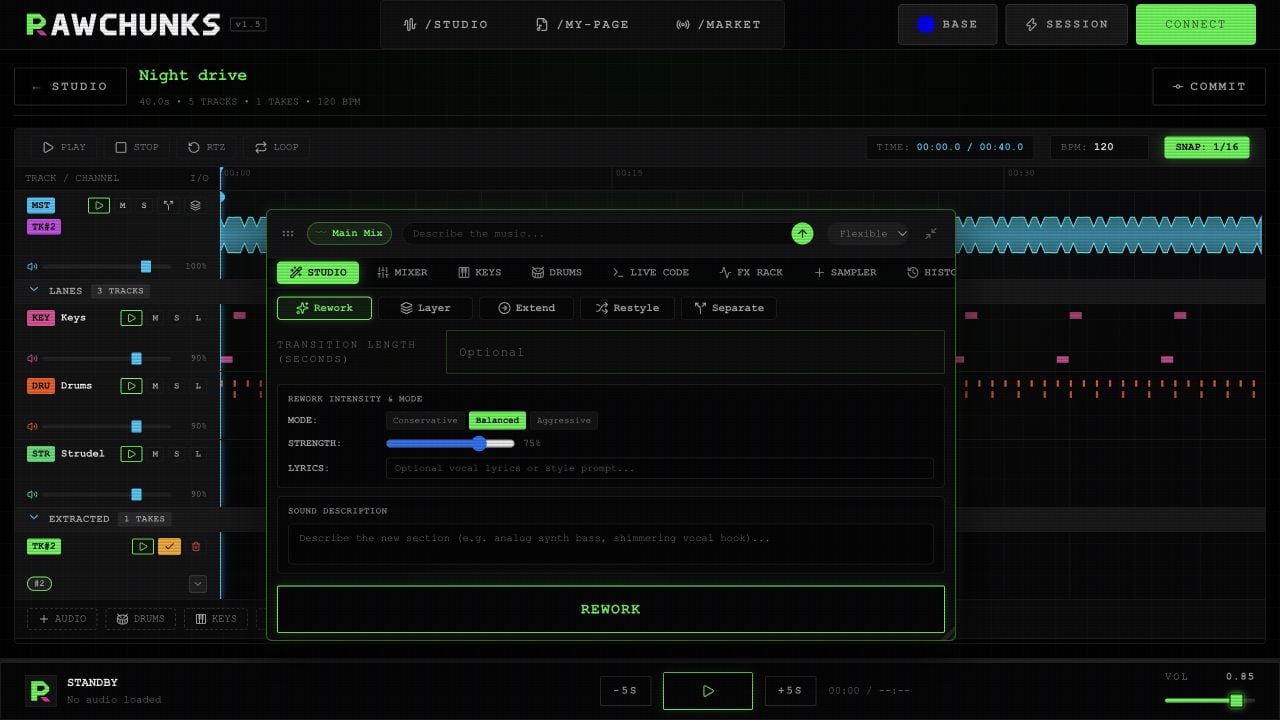
Example project, shown in the Rawchunks editor.
Read the arrangement
Master holds the song’s main audio. LANES holds stems and added parts. EXTRACTED holds takes from processing and extraction. Select a lane to focus the tools on it. The toolbox’s context chip shows the selected lane or take and the time range. Its clear button returns focus to Main Mix and clears the range. Expand or collapse LANES and EXTRACTED with their section headers. After separation, the colored instrument badges on Master select a stem; they don’t start playback. Master’s M silences the original recording while enabled mounted takes keep playing.Select and listen
Click the waveform to seek. Drag over it to select a range. Drag the start or end handles to adjust a boundary; drag the small move handle to move the whole range.
Outside text fields: Space plays or pauses, Shift+Space auditions a range, L toggles looping, and Home or 0 seeks to the start.
The timeline’s SNAP button currently does not snap waveform selections. Place boundaries by listening and moving the handles.
The BPM field is not a reliable live tempo control for Keys and Drums yet. Live Code’s RUN PATTERN applies the displayed BPM. Check the played rhythm before lining it up with another track.