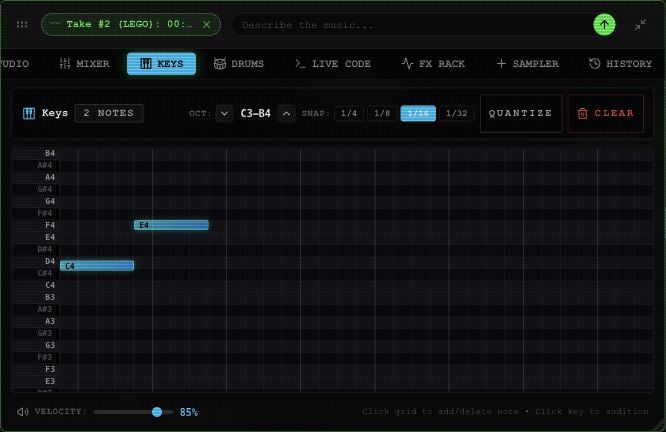
Open KEYS in the toolbox. If there isn’t a piano track, select CREATE KEYS TRACK.
Keys piano roll with pitch rows, timing grid, note length, octave controls, quantize, clear and velocity.

Keys with an example note pattern in the Rawchunks editor.

  1. Select a key in the left gutter to hear its pitch. Use OCT arrows to view another octave range.
  2. Choose 1/4, 1/8, 1/16, or 1/32 for the length of new notes.
  3. Select a pitch/time cell to add a note. Select an existing note to remove it.
  4. Adjust VELOCITY for subsequent notes and key previews, from 10–100%.
  5. Use the board’s PLAY control to hear the repeating two-bar part alongside the arrangement.
QUANTIZE moves existing note starts and lengths to the chosen grid. CLEAR removes the notes. Changing Velocity doesn’t change notes you’ve already entered. The current piano roll supports cell-based entry. It does not offer MIDI file import/export or hardware MIDI input. For tempo, see the editor’s BPM control. Use Mixer and effects to balance this lane. Merge all only includes mounted takes on Master, so it does not automatically bake a Keys lane into the song.