Browse public originals and remixes, filter by a style tag, and use the player.
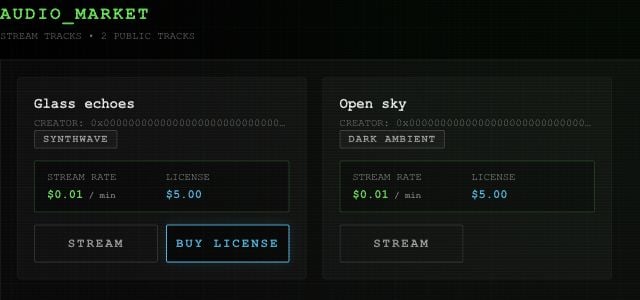
Open MARKET for the current public catalog. Cards show the title, creator, style tags, listed stream rate, and an original’s license price.
Example public tracks, shown with the app's Market cards.
Select a style tag to filter by that exact tag. Use CLEAR FILTER to show the catalog again. If a card offers numbered versions, choose the one you want before listening or buying.Select STREAM to play a track and PAUSE to pause it. The displayed stream rate is a listing term; the current player does not meter listening charges.
The player also handles PLAY from Studio or My Page. It keeps the active song available while you move between those pages.Select its play/pause icon, use −5s / +5s to jump, or select the progress bar to seek. The time display shows elapsed and total duration. On desktop, VOL changes the volume; the slider is hidden on phones.The editor has its own arrangement transport for lanes and takes.
Use BUY LICENSE when offered, then open MY-PAGE → MY LICENSES → REMIX. Read the license walkthrough for network selection, purchase, and reuse.A REMIX badge identifies a remix. It is a label, not another remix action.
⌘I
Assistant
Responses are generated using AI and may contain mistakes.