

1
Describe the change
Enter SOUND DESCRIPTION or use the toolbox’s Describe the music… field. Describe the new part: “A dry snare and sparse bass under the vocal,” for example. Add optional LYRICS for the section.
2
Choose how much to change
Under REWORK INTENSITY & MODE, choose Conservative, Balanced, or Aggressive. STRENGTH is adjustable only in Balanced, from 0–100%.Transition length (seconds) offers 0–10 seconds to guide the join around the changed section. Listen to the join after processing.
3
Make the take
Choose an available Flexible, Detailed, or Fast processing mode in the toolbox header. Select REWORK and wait for the operation to finish.
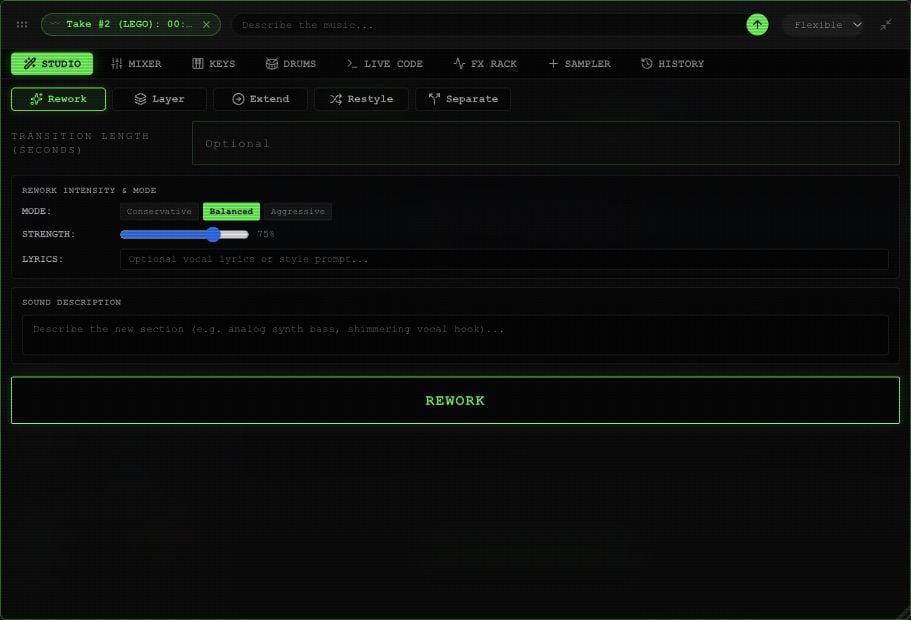
Rework controls in an example Rawchunks project.