> ## Documentation Index
> Fetch the complete documentation index at: https://docs.rawchunks.space/llms.txt
> Use this file to discover all available pages before exploring further.
# Import or record a sample
> Preview audio, divide it into equal slices, and add a file or slice as a lane.
Open **SAMPLER** in the toolbox.
Drop one file into the importer or select the browse area. The panel lists **WAV**, **MP3**, **FLAC**, and **OGG**; playback depends on your browser's audio support.
To record a microphone, select **RECORD VOICE**, allow microphone access, then **STOP** when finished.
Use **PREVIEW** for the full recording. Choose **SLICES: 2, 4, 8, or 16** to divide it equally, then select a slice to hear and choose it. Full-file Preview clears the slice selection.
Select **ADD TO WORKSTATION**. This uploads the audio and adds the chosen slice, or the whole recording, as a new sample lane at the start of the timeline.
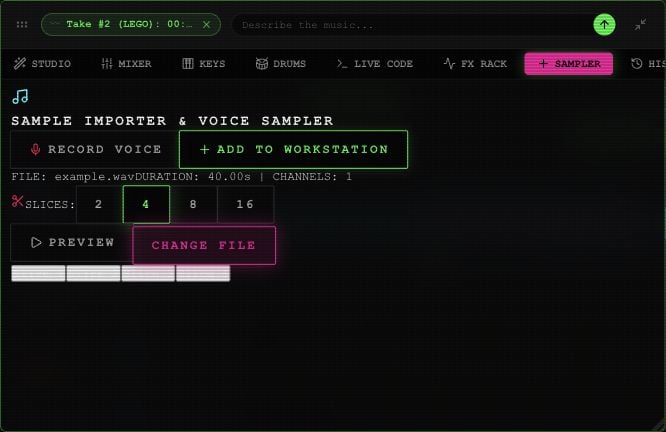 **CHANGE FILE** chooses another source. The slices are equal divisions, not automatically detected drum hits.
Microphone recording here is ordinary audio recording. For a vocal reference or trained voice used in generation, use [Custom Vocal](/app/voices).
The board's **AUDIO** button adds another source-song clip. Use **SAMPLER** when you want to import your own file.
This documentation is built and hosted on [Mintlify](https://mintlify.com), a developer documentation platform.
**CHANGE FILE** chooses another source. The slices are equal divisions, not automatically detected drum hits.
Microphone recording here is ordinary audio recording. For a vocal reference or trained voice used in generation, use [Custom Vocal](/app/voices).
The board's **AUDIO** button adds another source-song clip. Use **SAMPLER** when you want to import your own file.
This documentation is built and hosted on [Mintlify](https://mintlify.com), a developer documentation platform.