> ## Documentation Index
> Fetch the complete documentation index at: https://docs.rawchunks.space/llms.txt
> Use this file to discover all available pages before exploring further.
# Rework a section
> Generate a new take for a selected part of the song.
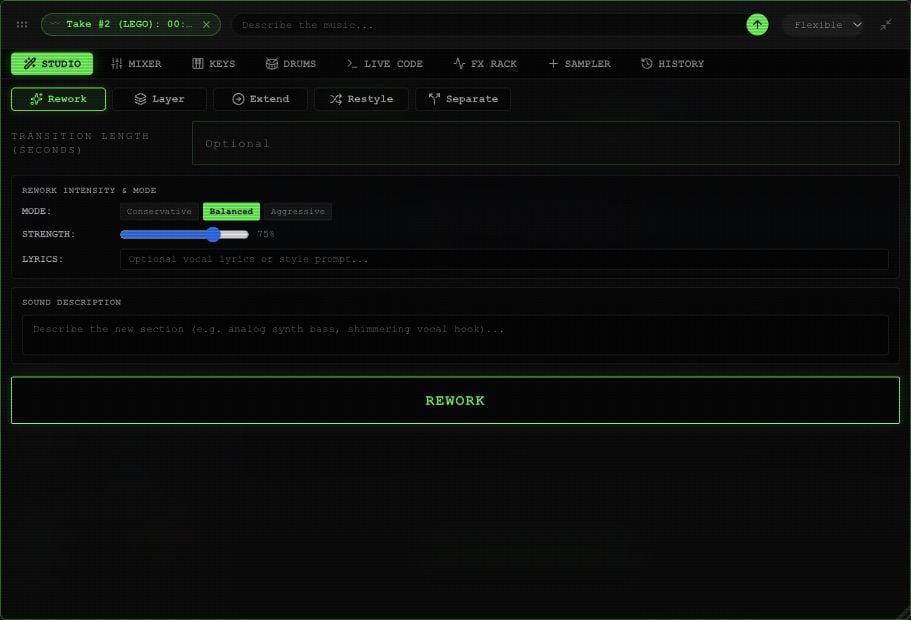
Select the part you want to change on the waveform, then **REWORK**. You can also open **STUDIO** in the toolbox and choose **Rework**.
Enter **SOUND DESCRIPTION** or use the toolbox's **Describe the music…** field. Describe the new part: “A dry snare and sparse bass under the vocal,” for example. Add optional **LYRICS** for the section.
Under **REWORK INTENSITY & MODE**, choose **Conservative**, **Balanced**, or **Aggressive**. **STRENGTH** is adjustable only in Balanced, from **0–100%**.
**Transition length (seconds)** offers **0–10 seconds** to guide the join around the changed section. Listen to the join after processing.
Choose an available **Flexible**, **Detailed**, or **Fast** processing mode in the toolbox header. Select **REWORK** and wait for the operation to finish.
 The completed result appears as a take under **EXTRACTED**. Use the take's play button to listen, then [mount and merge it](/app/takes-merge) when you're happy with it. Online processing uses your [session budget](/app/payments).
This documentation is built and hosted on [Mintlify](https://mintlify.com), a developer documentation platform.
The completed result appears as a take under **EXTRACTED**. Use the take's play button to listen, then [mount and merge it](/app/takes-merge) when you're happy with it. Online processing uses your [session budget](/app/payments).
This documentation is built and hosted on [Mintlify](https://mintlify.com), a developer documentation platform.