> ## Documentation Index
> Fetch the complete documentation index at: https://docs.rawchunks.space/llms.txt
> Use this file to discover all available pages before exploring further.
# Service prices and session spending
> Check per-request prices and set a spending cap for your session.
Rawchunks charges for generation, online edits, and saving voice samples. Service payments use USDC and x402. In the app, you authorize spending through **SESSION**.
## Service prices
| Action | Price per request |
| - | -: |
| Generate with **FAST** | \$0.05 |
| Generate with **STUDIO MASTER** | \$0.10 |
| **Rework**, **Layer**, **Extend**, or **Restyle** | \$0.02 |
| **Separate** stems | \$0.02 |
| **Extract** a source section | \$0.02 |
| **SAVE VOICE** from a song | \$0.05 |
| Upload a vocal reference for generation | \$0.10 |
A new vocal upload is charged separately from its generation. Saving a voice includes its preparation; there is no separate training purchase in the app.
Prices are per request. Don't assume an unsuccessful request is free or automatically refunded.
## Start a session
Connect your account and choose the payment network in the header. You need enough USDC on that network for the cap you select.
Open **SESSION**. Choose **$1**, **$5**, **$10**, **$25**, **$50**, or a custom amount of at least **$0.10**. Choose **1 HOUR**, **6 HOURS**, **24 HOURS**, or **7 DAYS**.
Select **START SESSION** and review any approval or account-activation prompts. Wait for the session to become active before submitting paid work.
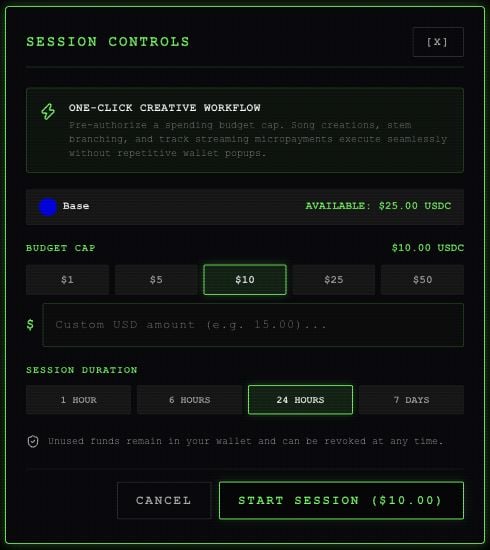 The default selection is **\$10 for 24 hours**. The cap authorizes spending; it is not an upfront purchase or subscription. A session belongs to one account and network. Switching networks does not transfer its funds or authorization.
## Check or end a session
Reopen **SESSION** to see the displayed remaining budget, limit, amount used, and expiration. Use the refresh button to retrieve the current status.
**END SESSION** revokes the session key. It does not remove an existing token approval from your wallet. Minting and buying licenses can still require separate wallet prompts.
## Selling prices are separate
Studio's **FINANCIALS** sets the prices you list for a song. It does not show the generation fee. The generation confirmation also shows those selling terms.
See [publishing and selling terms](/app/publish) for the stream rate, license price, and license allocation. Wallet transaction or account-activation costs are separate from the service prices above.
This documentation is built and hosted on [Mintlify](https://mintlify.com), a developer documentation platform.
The default selection is **\$10 for 24 hours**. The cap authorizes spending; it is not an upfront purchase or subscription. A session belongs to one account and network. Switching networks does not transfer its funds or authorization.
## Check or end a session
Reopen **SESSION** to see the displayed remaining budget, limit, amount used, and expiration. Use the refresh button to retrieve the current status.
**END SESSION** revokes the session key. It does not remove an existing token approval from your wallet. Minting and buying licenses can still require separate wallet prompts.
## Selling prices are separate
Studio's **FINANCIALS** sets the prices you list for a song. It does not show the generation fee. The generation confirmation also shows those selling terms.
See [publishing and selling terms](/app/publish) for the stream rate, license price, and license allocation. Wallet transaction or account-activation costs are separate from the service prices above.
This documentation is built and hosted on [Mintlify](https://mintlify.com), a developer documentation platform.