> ## Documentation Index
> Fetch the complete documentation index at: https://docs.rawchunks.space/llms.txt
> Use this file to discover all available pages before exploring further.
# Set the musical direction
> Choose style tags, duration, tempo, key, scale and vocal language.
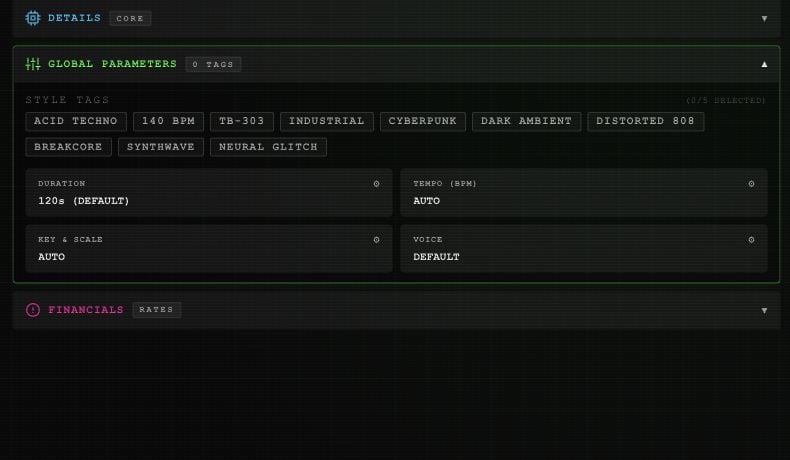
Open **GLOBAL PARAMETERS** in Studio. Each parameter button opens its own controls; **DONE** closes them after your selection.
 ## Style tags
Choose up to five: **ACID TECHNO**, **140 BPM**, **TB-303**, **INDUSTRIAL**, **CYBERPUNK**, **DARK AMBIENT**, **DISTORTED 808**, **BREAKCORE**, **SYNTHWAVE**, or **NEURAL GLITCH**. Select a tag again to remove it.
These tags describe the sound. The **140 BPM** tag does not set the separate tempo control.
## Duration
**DURATION** offers **30, 60, 90, 120, 180, 240, or 300 seconds**. The custom slider covers **15–300 seconds** in five-second steps.
The button shows **120s (DEFAULT)** when unset. **RESET TO DEFAULT** clears your explicit target. Listen and check the completed track's length; the label is not a promise of an exact output duration.
## Tempo
**TEMPO (BPM)** offers **80**, **110**, **128**, **140**, **160**, and **174 BPM**, plus a custom slider from **40–220 BPM**. **AUTO (NONE)** clears the target.
## Key and scale
In **KEY & SCALE**, choose a root from **C** through **B**, including sharps, then **major**, **minor**, **dorian**, **phrygian**, or **mixolydian**. **AUTO / CLEAR** removes the target.
Tempo, key, and scale guide generation. Check the audio before using it in a project that needs a precise match.
## Vocal language and voice
**LANGUAGE** is in **DETAILS**, beside **LYRICS**. Search by language name or code, select a result, then **DONE**. **AUTO** clears the language choice. The service supplies the available language list.
**VOICE** is in Global Parameters. See [custom voices](/app/voices) for reference uploads, saved voices, and the resemblance control.
This documentation is built and hosted on [Mintlify](https://mintlify.com), a developer documentation platform.
## Style tags
Choose up to five: **ACID TECHNO**, **140 BPM**, **TB-303**, **INDUSTRIAL**, **CYBERPUNK**, **DARK AMBIENT**, **DISTORTED 808**, **BREAKCORE**, **SYNTHWAVE**, or **NEURAL GLITCH**. Select a tag again to remove it.
These tags describe the sound. The **140 BPM** tag does not set the separate tempo control.
## Duration
**DURATION** offers **30, 60, 90, 120, 180, 240, or 300 seconds**. The custom slider covers **15–300 seconds** in five-second steps.
The button shows **120s (DEFAULT)** when unset. **RESET TO DEFAULT** clears your explicit target. Listen and check the completed track's length; the label is not a promise of an exact output duration.
## Tempo
**TEMPO (BPM)** offers **80**, **110**, **128**, **140**, **160**, and **174 BPM**, plus a custom slider from **40–220 BPM**. **AUTO (NONE)** clears the target.
## Key and scale
In **KEY & SCALE**, choose a root from **C** through **B**, including sharps, then **major**, **minor**, **dorian**, **phrygian**, or **mixolydian**. **AUTO / CLEAR** removes the target.
Tempo, key, and scale guide generation. Check the audio before using it in a project that needs a precise match.
## Vocal language and voice
**LANGUAGE** is in **DETAILS**, beside **LYRICS**. Search by language name or code, select a result, then **DONE**. **AUTO** clears the language choice. The service supplies the available language list.
**VOICE** is in Global Parameters. See [custom voices](/app/voices) for reference uploads, saved voices, and the resemblance control.
This documentation is built and hosted on [Mintlify](https://mintlify.com), a developer documentation platform.