> ## Documentation Index
> Fetch the complete documentation index at: https://docs.rawchunks.space/llms.txt
> Use this file to discover all available pages before exploring further.
# Balance lanes and add effects
> Adjust level, pan and tone, then enable effects for the selected lane.
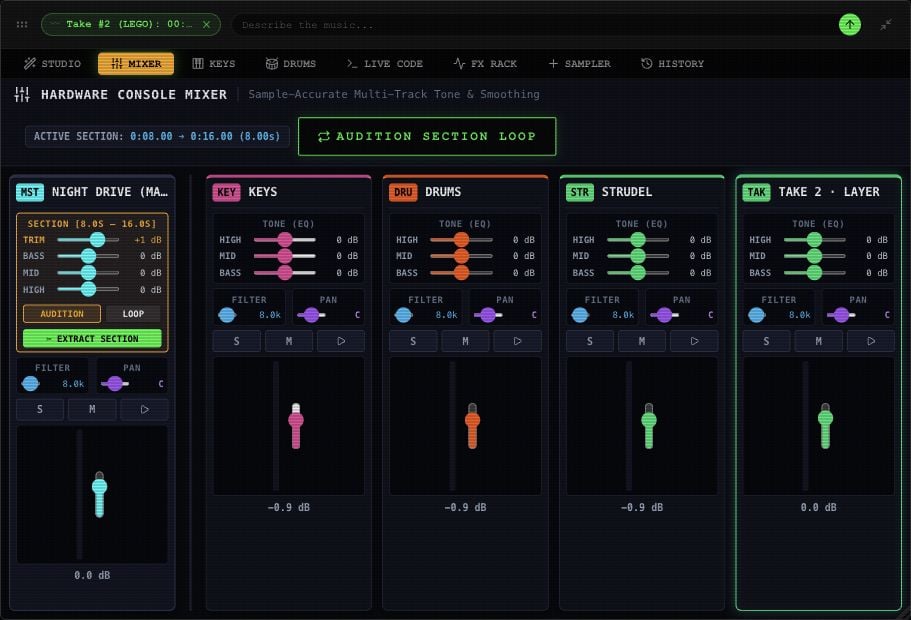
Select a lane and open **MIXER**. Use its fader for level, **PAN** for left/right position, and **BASS / MID / HIGH** for tone. The EQ controls cover **−12 to +12 dB**.
**M** mutes, **S** solos, and the lane play icon auditions it alone. You can solo more than one lane; a muted lane stays silent.
 ## Use the FX Rack
Open **FX RACK** for the selected lane. Each module has **ON / OFF**. EQ starts on; the other modules start bypassed. Enable a module, then adjust it while listening.
| Module | Controls |
| - | - |
| **3-BAND EQ** | Low, Mid, High gain |
| **STATE-VARIABLE FILTER** | Low-pass, high-pass or band-pass; cutoff and resonance |
| **SATURATION / DRIVE** | Drive and dry/wet blend |
| **STEREO CHORUS** | Rate, depth and dry/wet blend |
| **TEMPO FEEDBACK DELAY** | Delay time, feedback and dry/wet blend |
| **ALGORITHMIC REVERB** | Decay and dry/wet blend |
| **BUS COMPRESSOR** | Threshold, ratio, attack and release |
## Use the FX Rack
Open **FX RACK** for the selected lane. Each module has **ON / OFF**. EQ starts on; the other modules start bypassed. Enable a module, then adjust it while listening.
| Module | Controls |
| - | - |
| **3-BAND EQ** | Low, Mid, High gain |
| **STATE-VARIABLE FILTER** | Low-pass, high-pass or band-pass; cutoff and resonance |
| **SATURATION / DRIVE** | Drive and dry/wet blend |
| **STEREO CHORUS** | Rate, depth and dry/wet blend |
| **TEMPO FEEDBACK DELAY** | Delay time, feedback and dry/wet blend |
| **ALGORITHMIC REVERB** | Decay and dry/wet blend |
| **BUS COMPRESSOR** | Threshold, ratio, attack and release |
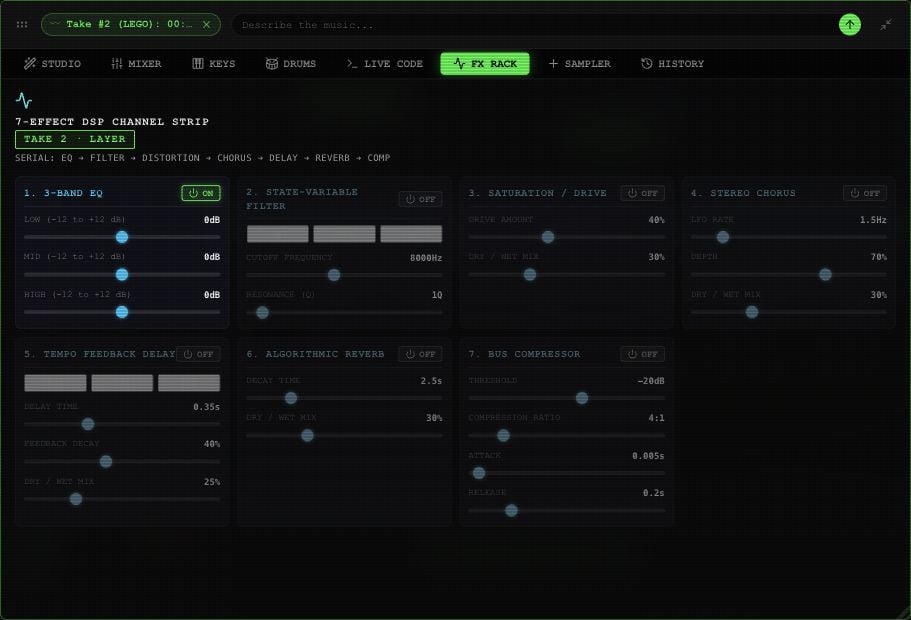 Enable the filter in FX Rack before using the Mixer's **FILTER** cutoff. Delay presets labeled **1/8**, **1/4**, and **1/2** currently use fixed times of **0.25**, **0.5**, and **1 second**; they don't follow BPM changes.
## Master and selected sections
Master's effects also affect takes mounted on it. Ordinary lanes have their own mixer controls.
The Mixer offers a trim control when a Master range is selected. Its section EQ currently changes Master tone across the song. Listen to the whole arrangement after adjusting it.
[Source extraction](/app/extract-separate) doesn't bake mixer changes or effects. [Merging](/app/takes-merge) keeps Master with the mounted takes you include.
This documentation is built and hosted on [Mintlify](https://mintlify.com), a developer documentation platform.
Enable the filter in FX Rack before using the Mixer's **FILTER** cutoff. Delay presets labeled **1/8**, **1/4**, and **1/2** currently use fixed times of **0.25**, **0.5**, and **1 second**; they don't follow BPM changes.
## Master and selected sections
Master's effects also affect takes mounted on it. Ordinary lanes have their own mixer controls.
The Mixer offers a trim control when a Master range is selected. Its section EQ currently changes Master tone across the song. Listen to the whole arrangement after adjusting it.
[Source extraction](/app/extract-separate) doesn't bake mixer changes or effects. [Merging](/app/takes-merge) keeps Master with the mounted takes you include.
This documentation is built and hosted on [Mintlify](https://mintlify.com), a developer documentation platform.