> ## Documentation Index
> Fetch the complete documentation index at: https://docs.rawchunks.space/llms.txt
> Use this file to discover all available pages before exploring further.
# Write lyrics and section tags
> Arrange lyric sections in the canvas or edit a complete sheet with bracketed tags.
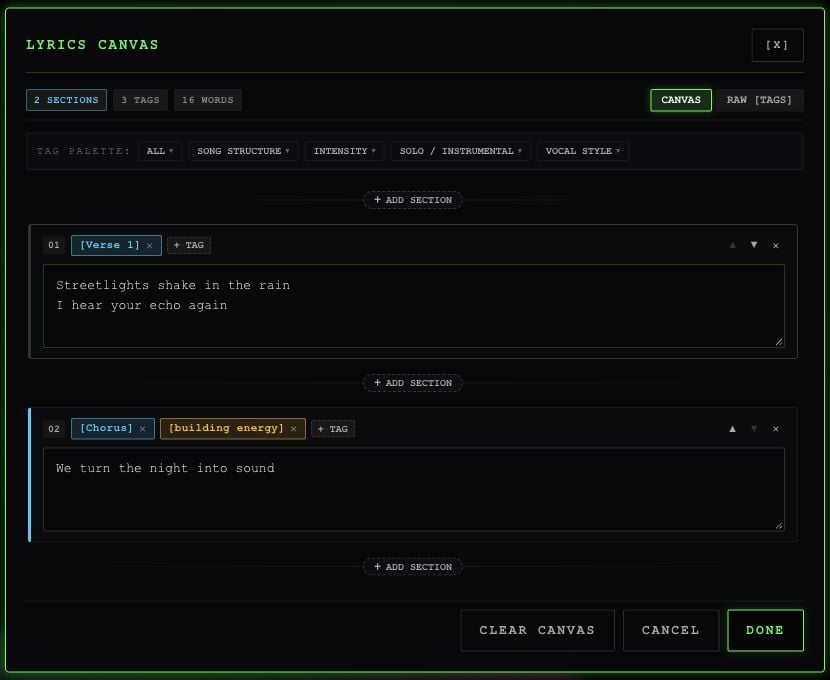
In Studio's **DETAILS**, leave **INSTRUMENTAL** off and select the expand icon inside **LYRICS**. This opens **LYRICS CANVAS**.
 ## Build sections in the canvas
1. In **CANVAS**, select a separator **+** and choose a tag to add a section.
2. Enter the lyrics in that section's text box.
3. Use **+ TAG** to add another direction to the same section. Remove a tag with its close button.
4. Use the section's arrows to move it up or down, or its delete control to remove it.
5. Select **DONE** to apply the sheet to Studio. **CANCEL** discards edits made in the lyrics dialog.
**CLEAR CANVAS** removes the current sections so you can start again.
## Tags you can choose
| Category | Tags | Use them to request… |
| - | - | - |
| Song structure | `[Intro]`, `[Verse]`, `[Verse 1]`, `[Verse 2]`, `[Pre-Chorus]`, `[Chorus]`, `[Bridge]`, `[Outro]`, `[End]` | An opening, verse, hook, contrast, or ending |
| Intensity | `[Build]`, `[Drop]`, `[Breakdown]`, `[Silence]` | A change in energy or space |
| Solo / instrumental | `[Instrumental]`, `[inst]`, `[Guitar Solo]`, `[Piano Interlude]`, `[Drum Break]` | A section led by instruments |
| Vocal style | `[whispered]`, `[raspy vocal]`, `[building energy]` | A vocal delivery |
Tags guide the result. They don't guarantee a particular performance or a precisely timed section.
## Edit the whole sheet
Switch to **RAW \[TAGS]** to paste or edit everything at once. Put tags on their own lines, followed by the words to sing:
```text theme={null}
[Verse 1]
Streetlights shake in the rain
I hear your echo again
[Chorus]
[building energy]
We turn the night into sound
```
Consecutive tags apply to the same section. Custom bracketed tags are kept, but the palette above gives you the app's named choices. You can switch back to **CANVAS** to edit the sheet as blocks.
This documentation is built and hosted on [Mintlify](https://mintlify.com), a developer documentation platform.
## Build sections in the canvas
1. In **CANVAS**, select a separator **+** and choose a tag to add a section.
2. Enter the lyrics in that section's text box.
3. Use **+ TAG** to add another direction to the same section. Remove a tag with its close button.
4. Use the section's arrows to move it up or down, or its delete control to remove it.
5. Select **DONE** to apply the sheet to Studio. **CANCEL** discards edits made in the lyrics dialog.
**CLEAR CANVAS** removes the current sections so you can start again.
## Tags you can choose
| Category | Tags | Use them to request… |
| - | - | - |
| Song structure | `[Intro]`, `[Verse]`, `[Verse 1]`, `[Verse 2]`, `[Pre-Chorus]`, `[Chorus]`, `[Bridge]`, `[Outro]`, `[End]` | An opening, verse, hook, contrast, or ending |
| Intensity | `[Build]`, `[Drop]`, `[Breakdown]`, `[Silence]` | A change in energy or space |
| Solo / instrumental | `[Instrumental]`, `[inst]`, `[Guitar Solo]`, `[Piano Interlude]`, `[Drum Break]` | A section led by instruments |
| Vocal style | `[whispered]`, `[raspy vocal]`, `[building energy]` | A vocal delivery |
Tags guide the result. They don't guarantee a particular performance or a precisely timed section.
## Edit the whole sheet
Switch to **RAW \[TAGS]** to paste or edit everything at once. Put tags on their own lines, followed by the words to sing:
```text theme={null}
[Verse 1]
Streetlights shake in the rain
I hear your echo again
[Chorus]
[building energy]
We turn the night into sound
```
Consecutive tags apply to the same section. Custom bracketed tags are kept, but the palette above gives you the app's named choices. You can switch back to **CANVAS** to edit the sheet as blocks.
This documentation is built and hosted on [Mintlify](https://mintlify.com), a developer documentation platform.