> ## Documentation Index
> Fetch the complete documentation index at: https://docs.rawchunks.space/llms.txt
> Use this file to discover all available pages before exploring further.
# Buy a license and make a remix
> Buy permission to remix an original, then open the remix from My Page.
A Rawchunks remix license lets your account create remixes of an original through the app. It isn't used up when you make a remix: you can make multiple remixes from the same licensed original.
## Buy a license
Open **MARKET** and find a song with **BUY LICENSE** enabled. Connect your account and select the song's network.
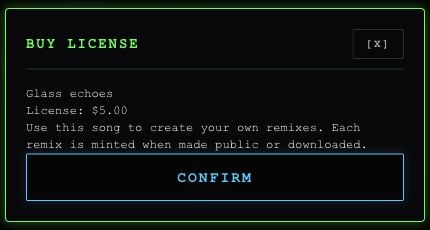
Select **BUY LICENSE**. Check the song and price in the dialog. The confirmed onchain license price is used for the purchase.
Select **CONFIRM** and review any token approval, account activation, or purchase prompts. Wait for ownership confirmation before continuing.
 The button is unavailable when no licenses remain or the song's license can't be verified. If you already own the license, Market hides **BUY LICENSE**; use My Page to remix it.
## Open a remix
1. Open **MY-PAGE → MY LICENSES**.
2. Select the original's network and choose **REMIX**.
3. The app opens a new remix in the editor. Use the [editing tools](/app/editor) to change it.
4. [Publish](/app/publish) or [download](/app/library#download-a-song) it when ready. Either can mint the remix and link it to the original.
The button is unavailable when no licenses remain or the song's license can't be verified. If you already own the license, Market hides **BUY LICENSE**; use My Page to remix it.
## Open a remix
1. Open **MY-PAGE → MY LICENSES**.
2. Select the original's network and choose **REMIX**.
3. The app opens a new remix in the editor. Use the [editing tools](/app/editor) to change it.
4. [Publish](/app/publish) or [download](/app/library#download-a-song) it when ready. Either can mint the remix and link it to the original.
 **MY LICENSES** checks the current public originals. A song can disappear from that list if its creator removes the public listing, even though your license remains owned.
## What is sold
Licenses are offered from the original's fixed allocation. Each purchase leaves fewer available licenses. For license payments, **80% goes to the original creator and 20% to the Rawchunks treasury**. On a $5 license, that is $4 and \$1.
Remixes show **REMIX** and cannot be licensed or remixed again in the app.
The app's purchase grants the remix workflow described here. The current purchase dialog does not provide separate terms for exclusivity, outside commercial distribution, or copyright ownership. Don't treat the button or mint as a grant of those additional rights.
This documentation is built and hosted on [Mintlify](https://mintlify.com), a developer documentation platform.
**MY LICENSES** checks the current public originals. A song can disappear from that list if its creator removes the public listing, even though your license remains owned.
## What is sold
Licenses are offered from the original's fixed allocation. Each purchase leaves fewer available licenses. For license payments, **80% goes to the original creator and 20% to the Rawchunks treasury**. On a $5 license, that is $4 and \$1.
Remixes show **REMIX** and cannot be licensed or remixed again in the app.
The app's purchase grants the remix workflow described here. The current purchase dialog does not provide separate terms for exclusivity, outside commercial distribution, or copyright ownership. Don't treat the button or mint as a grant of those additional rights.
This documentation is built and hosted on [Mintlify](https://mintlify.com), a developer documentation platform.