> ## Documentation Index
> Fetch the complete documentation index at: https://docs.rawchunks.space/llms.txt
> Use this file to discover all available pages before exploring further.
# Manage songs in My Page
> Find songs, choose versions, edit them, and download completed audio.
**MY-PAGE** has collapsible sections for **MY SONGS**, **MY LICENSES**, **MY ALBUMS**, and **MY VOICES**. Connect the account that owns your work and choose the matching network.
## Choose a song version
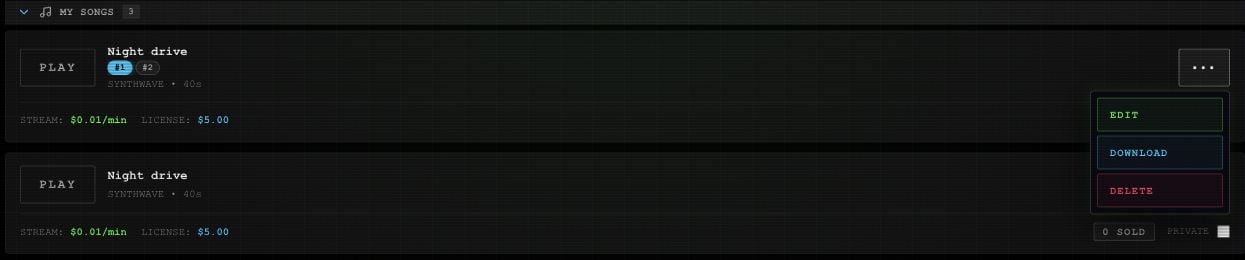
Related versions share a song card. Select a numbered version badge before playing or using the menu. Changing the active song's version loads that version and pauses playback.
Open **••• → EDIT** to continue in the editor. An unminted version opens directly; editing a minted version creates an editable version based on it.
 ## Download a song
Select the version, then **••• → DOWNLOAD**. Complete any required mint, activation, or wallet prompts. Once the audio is fetched, your browser starts the download with a title-based WAV filename.
The first download or publication of a song version can require a mint transaction. Review the wallet prompts before continuing. Making a listing private or deleting it later does not remove its onchain record or public metadata.
Downloading can mint a version even while its app listing says **PRIVATE**. If the audio download fails after minting, retrying the download does not undo that mint.
## List or remove a song
The **Public song** switch controls whether it appears in Market. Read [publishing](/app/publish) before enabling it for the first time.
**••• → DELETE** immediately deletes the selected song version from the library. The current app has no confirmation dialog or undo control for that action.
## Find other saved work
**MY LICENSES** provides the [REMIX entry](/app/licenses#open-a-remix) for purchased originals still in the public catalog. **MY ALBUMS** shows [album cards](/app/covers-albums). **MY VOICES** shows samples and [preparation status](/app/voices).
This documentation is built and hosted on [Mintlify](https://mintlify.com), a developer documentation platform.
## Download a song
Select the version, then **••• → DOWNLOAD**. Complete any required mint, activation, or wallet prompts. Once the audio is fetched, your browser starts the download with a title-based WAV filename.
The first download or publication of a song version can require a mint transaction. Review the wallet prompts before continuing. Making a listing private or deleting it later does not remove its onchain record or public metadata.
Downloading can mint a version even while its app listing says **PRIVATE**. If the audio download fails after minting, retrying the download does not undo that mint.
## List or remove a song
The **Public song** switch controls whether it appears in Market. Read [publishing](/app/publish) before enabling it for the first time.
**••• → DELETE** immediately deletes the selected song version from the library. The current app has no confirmation dialog or undo control for that action.
## Find other saved work
**MY LICENSES** provides the [REMIX entry](/app/licenses#open-a-remix) for purchased originals still in the public catalog. **MY ALBUMS** shows [album cards](/app/covers-albums). **MY VOICES** shows samples and [preparation status](/app/voices).
This documentation is built and hosted on [Mintlify](https://mintlify.com), a developer documentation platform.