> ## Documentation Index
> Fetch the complete documentation index at: https://docs.rawchunks.space/llms.txt
> Use this file to discover all available pages before exploring further.
# Add an instrument with Layer
> Generate a new part guided by Master or selected lanes.
Use **Layer** when you want a new instrument alongside the source: a bass part, percussion, or a piano answer to a melody.
Master is the starting reference. Use **L** on an ordinary lane to choose it as a Layer reference. Choosing an ordinary lane removes Master from the reference set; you can choose several lanes together.
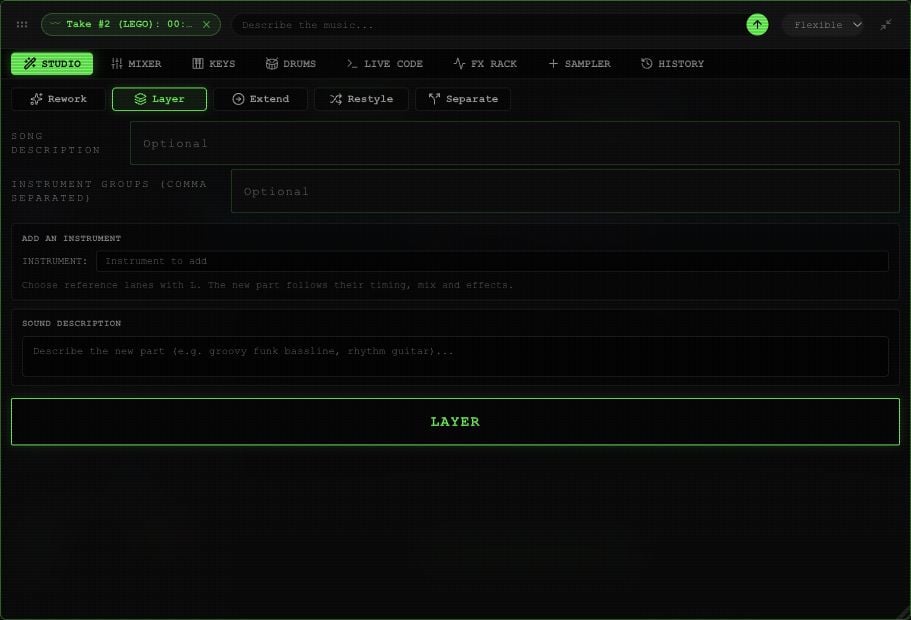
Open **STUDIO → Layer**. Under **ADD AN INSTRUMENT**, enter **INSTRUMENT**, then **SOUND DESCRIPTION**. Both are required.
You can also supply **Song description** and **Instrument groups (comma separated)**. Use these for context; keep the new part's request in Sound Description.
Layer currently uses **Flexible** processing. Select **LAYER** and wait for its take.
 The completed result appears as a take under **EXTRACTED**. Use the take's play button to listen, then [mount and merge it](/app/takes-merge) when you're happy with it. Online processing uses your [session budget](/app/payments).
To hear the new part alongside the song, mount it with **BASE**, keep **ORG** and **TK#** on, and adjust its placement. The [take controls](/app/takes-merge) explain how to compare and merge it.
This documentation is built and hosted on [Mintlify](https://mintlify.com), a developer documentation platform.
The completed result appears as a take under **EXTRACTED**. Use the take's play button to listen, then [mount and merge it](/app/takes-merge) when you're happy with it. Online processing uses your [session budget](/app/payments).
To hear the new part alongside the song, mount it with **BASE**, keep **ORG** and **TK#** on, and adjust its placement. The [take controls](/app/takes-merge) explain how to compare and merge it.
This documentation is built and hosted on [Mintlify](https://mintlify.com), a developer documentation platform.