> ## Documentation Index
> Fetch the complete documentation index at: https://docs.rawchunks.space/llms.txt
> Use this file to discover all available pages before exploring further.
# Write a Keys pattern
> Add notes to a repeating two-bar piano roll.
Open **KEYS** in the toolbox. If there isn't a piano track, select **CREATE KEYS TRACK**.
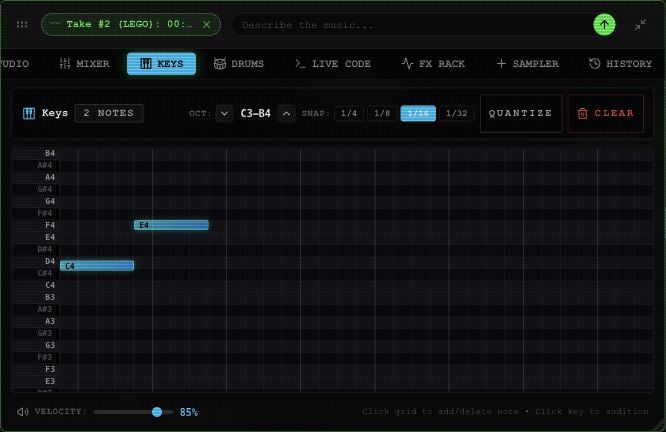 1. Select a key in the left gutter to hear its pitch. Use **OCT** arrows to view another octave range.
2. Choose **1/4**, **1/8**, **1/16**, or **1/32** for the length of new notes.
3. Select a pitch/time cell to add a note. Select an existing note to remove it.
4. Adjust **VELOCITY** for subsequent notes and key previews, from **10–100%**.
5. Use the board's **PLAY** control to hear the repeating two-bar part alongside the arrangement.
**QUANTIZE** moves existing note starts and lengths to the chosen grid. **CLEAR** removes the notes. Changing Velocity doesn't change notes you've already entered.
The current piano roll supports cell-based entry. It does not offer MIDI file import/export or hardware MIDI input.
For tempo, see the [editor's BPM control](/app/editor#select-and-listen).
Use [Mixer and effects](/app/mixer-effects) to balance this lane. [Merge all](/app/takes-merge#merge-all-mounted-takes) only includes mounted takes on Master, so it does not automatically bake a Keys lane into the song.
This documentation is built and hosted on [Mintlify](https://mintlify.com), a developer documentation platform.
1. Select a key in the left gutter to hear its pitch. Use **OCT** arrows to view another octave range.
2. Choose **1/4**, **1/8**, **1/16**, or **1/32** for the length of new notes.
3. Select a pitch/time cell to add a note. Select an existing note to remove it.
4. Adjust **VELOCITY** for subsequent notes and key previews, from **10–100%**.
5. Use the board's **PLAY** control to hear the repeating two-bar part alongside the arrangement.
**QUANTIZE** moves existing note starts and lengths to the chosen grid. **CLEAR** removes the notes. Changing Velocity doesn't change notes you've already entered.
The current piano roll supports cell-based entry. It does not offer MIDI file import/export or hardware MIDI input.
For tempo, see the [editor's BPM control](/app/editor#select-and-listen).
Use [Mixer and effects](/app/mixer-effects) to balance this lane. [Merge all](/app/takes-merge#merge-all-mounted-takes) only includes mounted takes on Master, so it does not automatically bake a Keys lane into the song.
This documentation is built and hosted on [Mintlify](https://mintlify.com), a developer documentation platform.