> ## Documentation Index
> Fetch the complete documentation index at: https://docs.rawchunks.space/llms.txt
> Use this file to discover all available pages before exploring further.
# Extract a section or separate stems
> Download a slice of source audio, or split a recording into instrument lanes.
**EXTRACT** cuts out a time range. **Separate** splits a recording into stems such as vocals, drums, and bass.
## Extract a source section
1. Select **Master** or a separated source lane.
2. Drag a range over its waveform and adjust the handles.
3. Select **EXTRACT** in the board transport.
4. Wait for the source slice. It appears as a take under **EXTRACTED**, and the board action starts a WAV download.
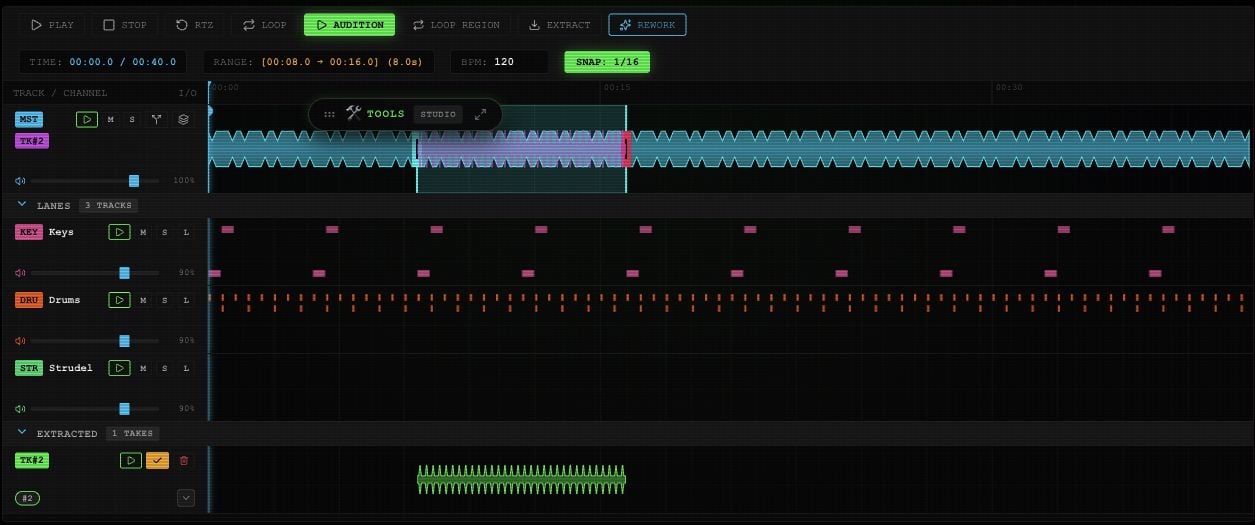 The Mixer also offers **EXTRACT SECTION**. That creates a take without starting the board's download.
Extraction uses the source audio. It does not include the current mixer or effects, and it is not an export of every added lane. See [mounting and merging](/app/takes-merge) to keep generated takes in Master.
## Separate stems
1. Open the toolbox's **STUDIO** tab and choose **Separate**.
2. Set **TARGET STEM** to **All**, **Vocals**, **Drums**, **Bass**, **Other**, or **Instrumental**.
3. Select **SEPARATE** and wait for the stems.
4. Expand **LANES**. Use the lane play buttons to check the parts, **M** to mute, **S** to solo, and the faders to balance them. New stems may start muted; check **M** before playback.
The Mixer also offers **EXTRACT SECTION**. That creates a take without starting the board's download.
Extraction uses the source audio. It does not include the current mixer or effects, and it is not an export of every added lane. See [mounting and merging](/app/takes-merge) to keep generated takes in Master.
## Separate stems
1. Open the toolbox's **STUDIO** tab and choose **Separate**.
2. Set **TARGET STEM** to **All**, **Vocals**, **Drums**, **Bass**, **Other**, or **Instrumental**.
3. Select **SEPARATE** and wait for the stems.
4. Expand **LANES**. Use the lane play buttons to check the parts, **M** to mute, **S** to solo, and the faders to balance them. New stems may start muted; check **M** before playback.
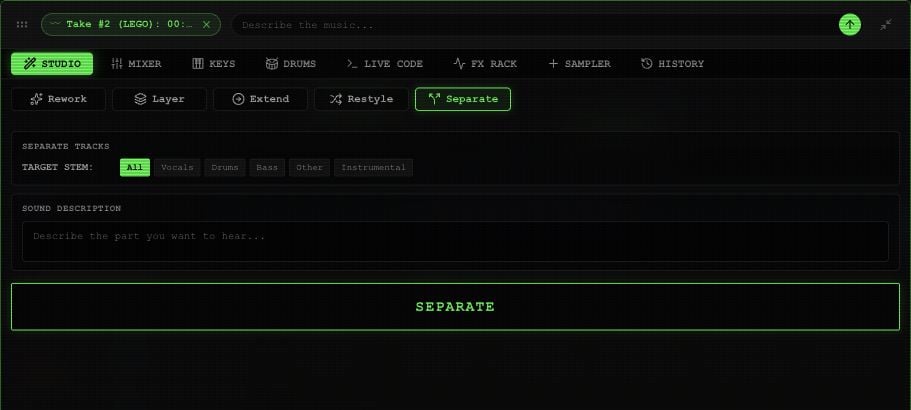 The Master row's split icon requests all stems the first time. Once stems exist, it switches between compact and expanded views.
Both source extraction and separation have [per-request service prices](/app/payments#service-prices).
This documentation is built and hosted on [Mintlify](https://mintlify.com), a developer documentation platform.
The Master row's split icon requests all stems the first time. Once stems exist, it switches between compact and expanded views.
Both source extraction and separation have [per-request service prices](/app/payments#service-prices).
This documentation is built and hosted on [Mintlify](https://mintlify.com), a developer documentation platform.