> ## Documentation Index
> Fetch the complete documentation index at: https://docs.rawchunks.space/llms.txt
> Use this file to discover all available pages before exploring further.
# Extend or restyle a song
> Continue past the ending or request a different musical style.
## Extend the ending
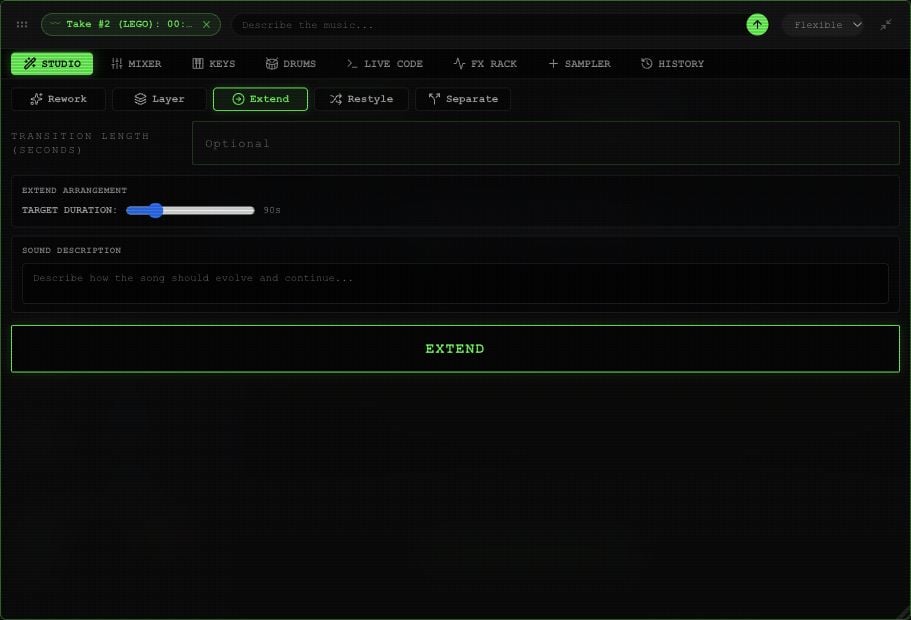
Open **STUDIO → Extend**. Set **TARGET DURATION** to the total length you want, not the number of seconds to add. To take a 40-second song to 90 seconds, choose **90s**.
The target must be longer than the current song. The control supports targets up to **300 seconds**. Add continuation instructions in **SOUND DESCRIPTION** if needed, and set the optional **Transition length** control.
Choose an available **Flexible**, **Detailed**, or **Fast** processing mode, then **EXTEND**.
 ## Change the style
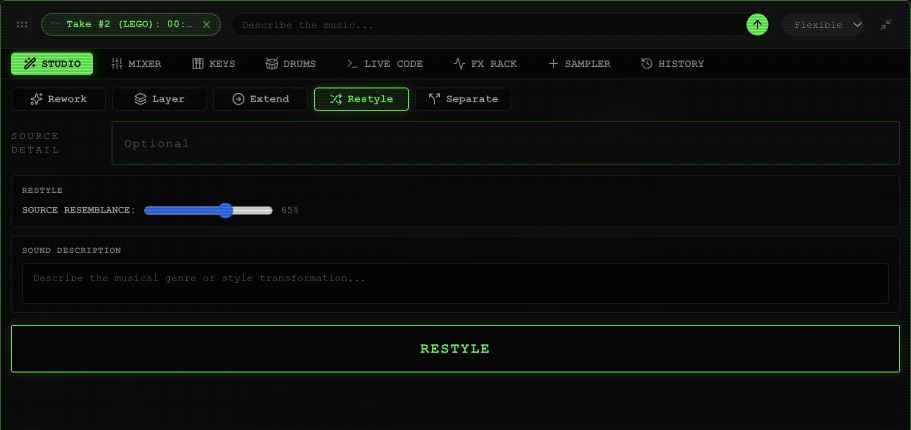
Open **STUDIO → Restyle** and describe the new sound in **SOUND DESCRIPTION**. For example: “Turn this into a slow acoustic arrangement with brushed drums.”
**SOURCE RESEMBLANCE** runs from **0–100%**, starting at **65%**. **Source detail** offers a separate **0–1** adjustment. These guide the transformation; compare the completed audio to hear what they changed.
Choose an available **Flexible**, **Detailed**, or **Fast** processing mode, then **RESTYLE**.
## Change the style
Open **STUDIO → Restyle** and describe the new sound in **SOUND DESCRIPTION**. For example: “Turn this into a slow acoustic arrangement with brushed drums.”
**SOURCE RESEMBLANCE** runs from **0–100%**, starting at **65%**. **Source detail** offers a separate **0–1** adjustment. These guide the transformation; compare the completed audio to hear what they changed.
Choose an available **Flexible**, **Detailed**, or **Fast** processing mode, then **RESTYLE**.
 The completed result appears as a take under **EXTRACTED**. Use the take's play button to listen, then [mount and merge it](/app/takes-merge) when you're happy with it. Online processing uses your [session budget](/app/payments).
This documentation is built and hosted on [Mintlify](https://mintlify.com), a developer documentation platform.
The completed result appears as a take under **EXTRACTED**. Use the take's play button to listen, then [mount and merge it](/app/takes-merge) when you're happy with it. Online processing uses your [session budget](/app/payments).
This documentation is built and hosted on [Mintlify](https://mintlify.com), a developer documentation platform.