> ## Documentation Index
> Fetch the complete documentation index at: https://docs.rawchunks.space/llms.txt
> Use this file to discover all available pages before exploring further.
# Use the editor
> Select a section, listen to lanes, and find the workstation tools.
Open a **READY** Studio track with **EDIT**, or use **MY-PAGE → MY SONGS → ••• → EDIT**. Editing an already minted version opens a new editable version based on it.
 ## Read the arrangement
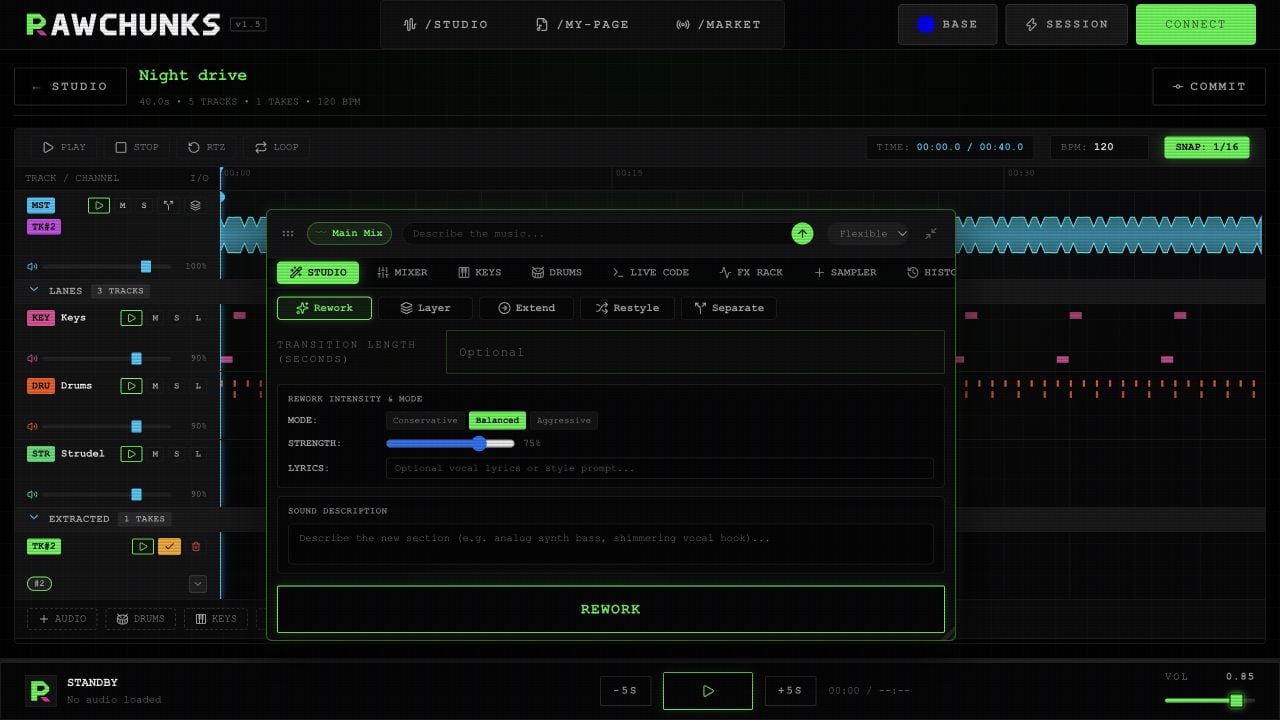
**Master** holds the song's main audio. **LANES** holds stems and added parts. **EXTRACTED** holds takes from processing and extraction.
Select a lane to focus the tools on it. The toolbox's context chip shows the selected lane or take and the time range. Its clear button returns focus to **Main Mix** and clears the range.
Expand or collapse **LANES** and **EXTRACTED** with their section headers. After separation, the colored instrument badges on Master select a stem; they don't start playback. Master's **M** silences the original recording while enabled mounted takes keep playing.
## Select and listen
Click the waveform to seek. Drag over it to select a range. Drag the start or end handles to adjust a boundary; drag the small move handle to move the whole range.
| Control | What it does |
| - | - |
| **PLAY / PAUSE** | Play or pause the arrangement |
| **STOP** | Stop and return to the beginning |
| **RTZ** | Seek to the beginning |
| **AUDITION** | Play the selected range once |
| **LOOP REGION** | Repeat the selected range |
| **LOOP** | Toggle looping of the selection, or the song when no range is selected |
| Lane play icon | Listen to that lane alone |
| **M / S** | Mute or solo a lane |
Outside text fields: **Space** plays or pauses, **Shift+Space** auditions a range, **L** toggles looping, and **Home** or **0** seeks to the start.
The timeline's **SNAP** button currently does not snap waveform selections. Place boundaries by listening and moving the handles.
The **BPM** field is not a reliable live tempo control for Keys and Drums yet. [Live Code's RUN PATTERN](/app/live-code) applies the displayed BPM. Check the played rhythm before lining it up with another track.
## Open the tool you need
The floating toolbox offers **STUDIO**, **MIXER**, **KEYS**, **DRUMS**, **LIVE CODE**, **FX RACK**, **SAMPLER**, and **HISTORY**. Drag its header to move it, resize from the corner, or collapse it to **TOOLS**. On phones it starts collapsed.
The board's **AUDIO**, **DRUMS**, **KEYS**, and **CODE** buttons add a source-song clip or an empty pattern lane. Use **SAMPLER** to import your own audio file.
| Work | Guide |
| - | - |
| Change a section | [Rework](/app/rework) |
| Pull out a section or stems | [Extract and Separate](/app/extract-separate) |
| Add an instrument | [Layer](/app/layer) |
| Continue or change a song's style | [Extend and Restyle](/app/extend-restyle) |
| Compare and keep a take | [Mount and merge](/app/takes-merge) |
| Build your own parts | [Keys](/app/keys), [Drums](/app/drums), [Live Code](/app/live-code), [Sampler](/app/samples) |
| Balance the sound | [Mixer and effects](/app/mixer-effects) |
| Save a project milestone | [History and snapshots](/app/history) |
This documentation is built and hosted on [Mintlify](https://mintlify.com), a developer documentation platform.
## Read the arrangement
**Master** holds the song's main audio. **LANES** holds stems and added parts. **EXTRACTED** holds takes from processing and extraction.
Select a lane to focus the tools on it. The toolbox's context chip shows the selected lane or take and the time range. Its clear button returns focus to **Main Mix** and clears the range.
Expand or collapse **LANES** and **EXTRACTED** with their section headers. After separation, the colored instrument badges on Master select a stem; they don't start playback. Master's **M** silences the original recording while enabled mounted takes keep playing.
## Select and listen
Click the waveform to seek. Drag over it to select a range. Drag the start or end handles to adjust a boundary; drag the small move handle to move the whole range.
| Control | What it does |
| - | - |
| **PLAY / PAUSE** | Play or pause the arrangement |
| **STOP** | Stop and return to the beginning |
| **RTZ** | Seek to the beginning |
| **AUDITION** | Play the selected range once |
| **LOOP REGION** | Repeat the selected range |
| **LOOP** | Toggle looping of the selection, or the song when no range is selected |
| Lane play icon | Listen to that lane alone |
| **M / S** | Mute or solo a lane |
Outside text fields: **Space** plays or pauses, **Shift+Space** auditions a range, **L** toggles looping, and **Home** or **0** seeks to the start.
The timeline's **SNAP** button currently does not snap waveform selections. Place boundaries by listening and moving the handles.
The **BPM** field is not a reliable live tempo control for Keys and Drums yet. [Live Code's RUN PATTERN](/app/live-code) applies the displayed BPM. Check the played rhythm before lining it up with another track.
## Open the tool you need
The floating toolbox offers **STUDIO**, **MIXER**, **KEYS**, **DRUMS**, **LIVE CODE**, **FX RACK**, **SAMPLER**, and **HISTORY**. Drag its header to move it, resize from the corner, or collapse it to **TOOLS**. On phones it starts collapsed.
The board's **AUDIO**, **DRUMS**, **KEYS**, and **CODE** buttons add a source-song clip or an empty pattern lane. Use **SAMPLER** to import your own audio file.
| Work | Guide |
| - | - |
| Change a section | [Rework](/app/rework) |
| Pull out a section or stems | [Extract and Separate](/app/extract-separate) |
| Add an instrument | [Layer](/app/layer) |
| Continue or change a song's style | [Extend and Restyle](/app/extend-restyle) |
| Compare and keep a take | [Mount and merge](/app/takes-merge) |
| Build your own parts | [Keys](/app/keys), [Drums](/app/drums), [Live Code](/app/live-code), [Sampler](/app/samples) |
| Balance the sound | [Mixer and effects](/app/mixer-effects) |
| Save a project milestone | [History and snapshots](/app/history) |
This documentation is built and hosted on [Mintlify](https://mintlify.com), a developer documentation platform.