> ## Documentation Index
> Fetch the complete documentation index at: https://docs.rawchunks.space/llms.txt
> Use this file to discover all available pages before exploring further.
# Build a drum pattern
> Program a repeating beat with the five-row, 16-step drum grid.
Open **DRUMS** in the toolbox. Select **CREATE DRUM TRACK** if you need one.
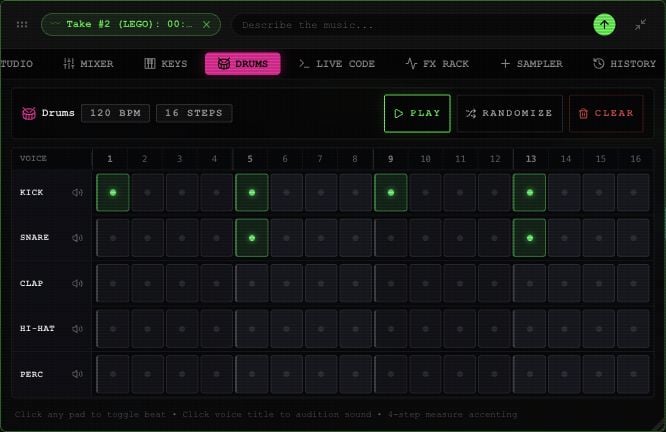 1. Select pads to add or remove hits in the **KICK**, **SNARE**, **CLAP**, **HI-HAT**, and **PERC** rows.
2. Select a row's name to preview that sound. Enabling a pad also previews it.
3. Select **PLAY** to hear the one-bar pattern repeat with the arrangement.
4. Use **RANDOMIZE** for a new random pattern or **CLEAR** to empty the grid.
**STOP** in this panel pauses playback. The board's **STOP** also returns to the beginning.
There is no drum-kit picker or per-step velocity control in the current panel. Use the lane fader and [effects](/app/mixer-effects) to change its overall balance.
For tempo, see the [editor's BPM control](/app/editor#select-and-listen).
This documentation is built and hosted on [Mintlify](https://mintlify.com), a developer documentation platform.
1. Select pads to add or remove hits in the **KICK**, **SNARE**, **CLAP**, **HI-HAT**, and **PERC** rows.
2. Select a row's name to preview that sound. Enabling a pad also previews it.
3. Select **PLAY** to hear the one-bar pattern repeat with the arrangement.
4. Use **RANDOMIZE** for a new random pattern or **CLEAR** to empty the grid.
**STOP** in this panel pauses playback. The board's **STOP** also returns to the beginning.
There is no drum-kit picker or per-step velocity control in the current panel. Use the lane fader and [effects](/app/mixer-effects) to change its overall balance.
For tempo, see the [editor's BPM control](/app/editor#select-and-listen).
This documentation is built and hosted on [Mintlify](https://mintlify.com), a developer documentation platform.